Monitoring Done Right: How to Build a Proactive IT Operations Culture
Monitoring is one of those topics almost every IT team talks about — and almost every IT team gets wrong. When someone says “monitoring,” the immediate image is software, a dashboard, or a screen full of red and green alerts. But monitoring is not a tool or a collection of graphs.
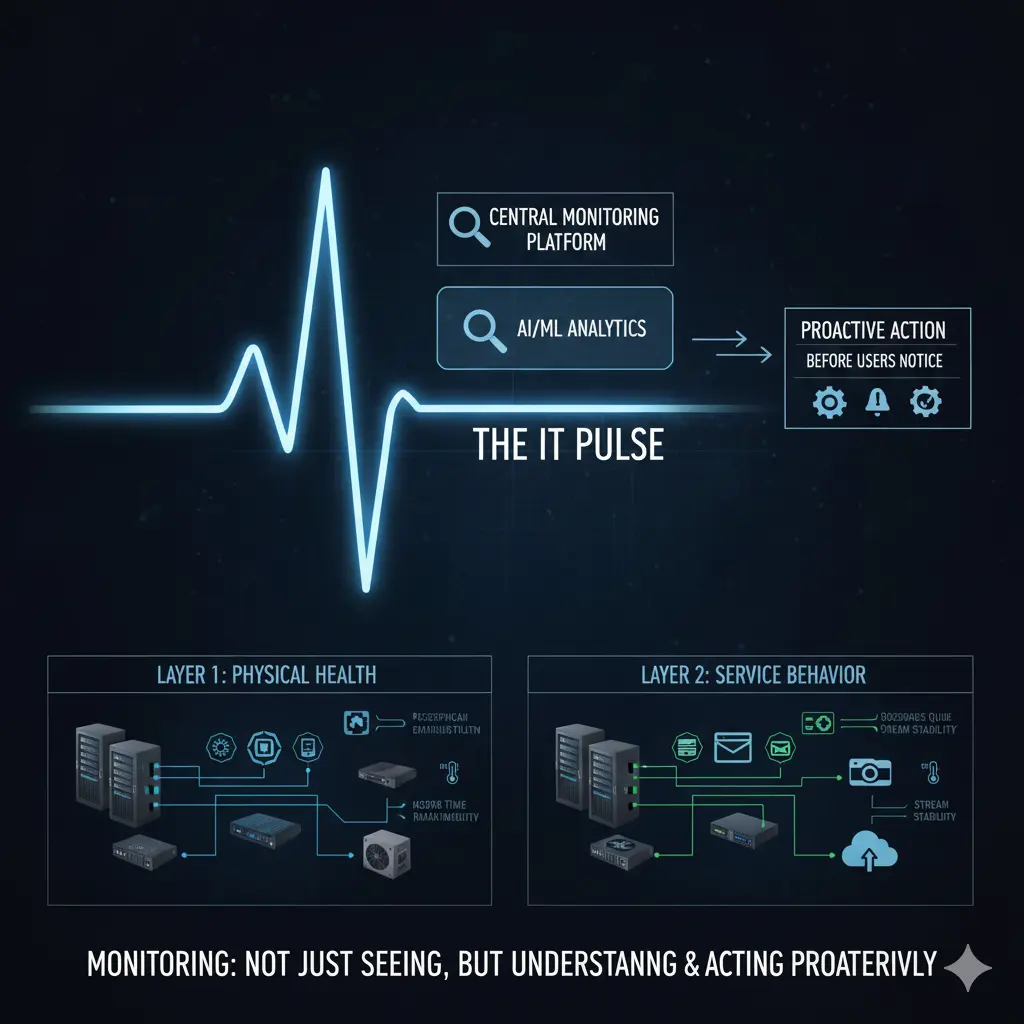
The real value of monitoring is seeing problems before users do — and acting before they escalate.
As IT infrastructures grow and diversify, the question “is everything working?” becomes increasingly meaningless. Modern environments run physical servers, virtualization platforms, network devices, firewalls, access points, and dozens of different software systems simultaneously. Mail servers, file servers, camera systems, web applications, industry-specific business software — all must stay up at the same time. Monitoring is what makes it possible to catch something before it breaks.

This article is the operational layer of a broader architecture series. For the foundation: IT Infrastructure Is Not a Collection of Products
Two Core Layers: Physical Infrastructure and Software/Services
To approach monitoring correctly, you must first separate two distinct layers: physical infrastructure and the software/service layer. When this distinction is not made clearly, monitoring either stays incomplete or generates noise.
Physical infrastructure includes servers, network devices, firewalls, storage systems, access points, and the power and cooling components keeping everything alive. Problems at this layer usually start silently. A fan slows down. A power supply fluctuates. A CPU stays at high utilization for too long. The system is running — but it is not healthy. Monitoring’s job here is not to track “up/down” status, but health status. If a CPU has been pegged for hours or a fan is underperforming, the system is technically active but already at risk.
Key takeaway from this layer: physical infrastructure problems start silently; monitoring must focus on health indicators, not just availability.
Physical Layer Metrics: Configuration Before Tools
Physical infrastructure monitoring begins with hardware-level metrics: CPU and memory utilization, disk fill rates, power supply status, fan speeds, temperature readings. But there is a critical requirement — for these metrics to be meaningful, the devices’ operating systems must be stable and correctly configured.
If SNMP-based monitoring is the approach, SNMP configurations must be properly defined, access credentials correctly set, and the necessary network-level permissions granted. Without this, the monitoring system exists but the data is unreliable. Open-source solutions like Zabbix are highly capable here; commercial solutions like SolarWinds and PRTG typically offer easier deployment and management. But regardless of which tool is used, the tool does not solve the problem — the right metrics monitored at the right thresholds do.
The key to this layer: configuration comes before tooling; wrong data produces wrong alerts.
Software and Service Layer: One-Size-Fits-All Monitoring Doesn’t Work
At the software and service layer, monitoring becomes considerably more complex. Every application has different behavior, different load profiles, and different critical thresholds. For a web service, response time is what matters. For a mail server, queues and service states are more critical. For a file server, disk I/O is the priority. For a camera system, stream continuity and connection stability are the key indicators.
Add to this the industry-specific software each organization depends on. In hospitality: reservation systems. In healthcare: appointment and patient management systems. In manufacturing: production and automation software. Each of these is business-critical, and each requires a different monitoring approach. One-size-fits-all monitoring does not work at the software layer.
Summary of this layer: software monitoring cannot be generalized; it must be designed around business criticality.
Monitoring Without a Routine Loses Its Meaning
One of the most common reasons monitoring fails in organizations is that it never becomes part of the operational routine. Systems are deployed, a monitoring tool is set up, a few alerts are defined — and then, under the weight of daily operations, the whole thing fades into the background. Alerts are either ignored because there are too many, or problems are only discovered through user complaints because alerts were never properly tuned.
Monitoring must be a regularly reviewed process. Daily checks can be done through a simple checklist or automatically generated tasks in an ITSM system. IT teams already have daily and weekly work routines — monitoring checks must be deliberately added to those routines. If the organization uses an ITSM or task management system, monitoring reviews should be created as recurring tasks and assigned to the right people. This transforms monitoring from a “we’ll look when we can” habit into a measurable operational activity.
The core idea here: monitoring that is not reviewed loses its purpose; the process must be part of the routine.
The Real Value of Proactive Operations
This approach has an important side effect: time spent becomes visible. When an hour a day or a few hours a week are dedicated to monitoring, that time is not wasted. It produces concrete evidence that IT operations are running proactively. Problems are caught before they surface, resolved before users notice — and this proves that the IT team operates preventively, not reactively.
Central monitoring also enables problems to be analyzed from a single point. This both shortens time-to-resolution and makes root cause analysis possible. When the same type of problem recurs, the conversation shifts from “what happened” to “why did it happen.” That is where monitoring delivers its deepest value.
Key to this layer: monitoring enables proactive, not reactive operations; time and effort become visible and measurable.
Holistic Monitoring: Service Behavior Over Device Status
Ultimately, monitoring requires that network, server, firewall, wireless, and software layers be observed together — not in isolation. Monitoring only devices is not enough; the impact of those devices on business services must also be visible.
A firewall can be up while users cannot send email — that is a monitoring failure. A switch can be running while access points keep dropping connections — that is also a monitoring failure. The real value of monitoring is making visible how the IT infrastructure actually behaves. When that visibility exists, capacity planning improves, changes carry less risk, and operations become more predictable.
Final key: monitoring must be holistic; service behavior matters more than device status.
Conclusion
Monitoring is not dashboards, alerts, or graphs. Monitoring is the pulse of your infrastructure.
A well-designed monitoring practice allows IT teams to catch problems before users notice, respond in a planned and deliberate way, and manage infrastructure proactively rather than reactively. This transforms monitoring from a technical detail into a direct operational and strategic capability.
Monitoring is not something you “set up and leave running.” It is a process to be designed, operated, and continuously improved.
Related Articles
Architecture & Strategy
- 📐 IT Infrastructure Is Not a Collection of Products — The foundational article of this series
- 🏗️ Switch, Firewall, AP — Why Choosing the Right Products Is Not Enough — Architecture-first core network design
- 🛡️ The Zero Trust Mindset: Engineering Security as an Architecture, Not a Product — Security as architecture
- 🎯 Network Infrastructure Product Selection: Strategic Criteria and Field Experiences — Strategic vendor evaluation
Technical Engineering
- 🛠️ The Backdoor of the Network: Next-Gen Console Server Architecture — Out-of-band access
- 🛡️ Network Packet Broker (NPB) Masterclass — Traffic visibility and security strategy