Product Selection in Network Infrastructure: Strategic Criteria and Field Experiences
The reality of Switch – Firewall – AP selection, integration, and capacity
Most enterprise network projects start at the same point: product selection. And most of the time, they fail at the same point: products not working together. Because what we call a “core network” is not just three boxes (switch, firewall, access point) sitting side by side; it is about these three boxes carrying an identity together, generating segments together, enforcing policies together, and most importantly, sustaining operations together.
What I have seen over the years is this: a company’s network doesn’t struggle because it’s “bad,” but because the decision mechanism of the network is fragmented. You have the most expensive devices, the best licenses, the highest throughput… but when an incident occurs, no one knows who knows what, which device decides with which context, where the traffic diverges, or where it is controlled. The result: you have a “network,” but you don’t have “network behavior.”
In this article, I will analyze the core network across three pillars: Firewall, Switching, and Access (Wi-Fi). But before we begin, I want to clarify one thing: there are two factors that are as decisive as “technical specifications,” which most teams realize too late: reports/validation and support/lifecycle.

Filtering reports, tests, and “marketing noise”
One of the places to look when choosing a product is, yes, Gartner reports. Because reports like Gartner give you an idea of a product’s “market position”: who is the leader, who is the visionary, who is playing in a niche. This is especially useful for convincing decision-makers; it provides a framework for the “why this brand?” question at the budget table.
But there is a critical trap here: Gartner doesn’t tell you which one is right for your specific scenario. Gartner is a “market map”; your job is to draw the “architectural map.” Therefore, it’s better to use Gartner as an initial filter: it narrows down the options but doesn’t make the final decision.

In addition to Gartner, performance and security tests conducted by manufacturers or independent laboratories, comparative reports, and “real-world” benchmarks should be considered. Because the throughput on a data sheet is not the same as the throughput in real life when IPS is on, SSL decryption is active, and app-control is running. Reports serve as a second filter here: you look for a non-marketing answer to the question, “What does this box do under this load?”
Support and lifecycle: The invisible pillars holding the project up
What is as critical as a product’s technical capabilities is its support model and lifecycle. A network design is not just about the “installation day.” The real issue is what happens 3 years later:
- What are the EoL / EoS dates for this product?
- How is the speed of patches, bug fixes, and security updates?
- Is TAC/Support truly accessible, and how does the escalation process work?
- What is the reality of RMA processes and spare parts?
- Will the licensing model cause surprises after a year?
- Is the manufacturer’s roadmap aligned with your direction?
I specifically want to include this because the most common problem I see in the field is this: the team chooses a product that is technically close to correct, but because support/lifecycle was ignored, the operation turns into a nightmare 12 months later. Then the device gets the blame; however, the problem is not the device itself, but the lack of seriousness regarding the “support” side of the selection.
Firewall: UTM, NGFW, or multiple roles?
Nowadays, the firewall has long passed being just a “security device at the edge” of the network. If positioned correctly, it is the brain of the policy; if positioned incorrectly, it becomes a bottleneck because everything is dumped on it.
It’s good to clarify terminology from the start: UTM and NGFW concepts are often confused.
The UTM approach usually aligns with the “everything in one box” philosophy: basic firewall + IPS + web filter + AV + some gateway features. It is generally preferred in small/medium structures due to ease of management and the “all-in-one” package approach.
NGFW, on the other hand, is positioned with application awareness, user/identity awareness, more advanced security services, and policy depth. In today’s enterprise needs, running security with “just port-protocol” is often not enough; this is where NGFW comes in.
But the real critical point is this: a company’s needs may not end with a single “firewall type.” Because a firewall can take on different roles at different layers for different purposes.
Why are two (or even three) firewalls normal in the same company?
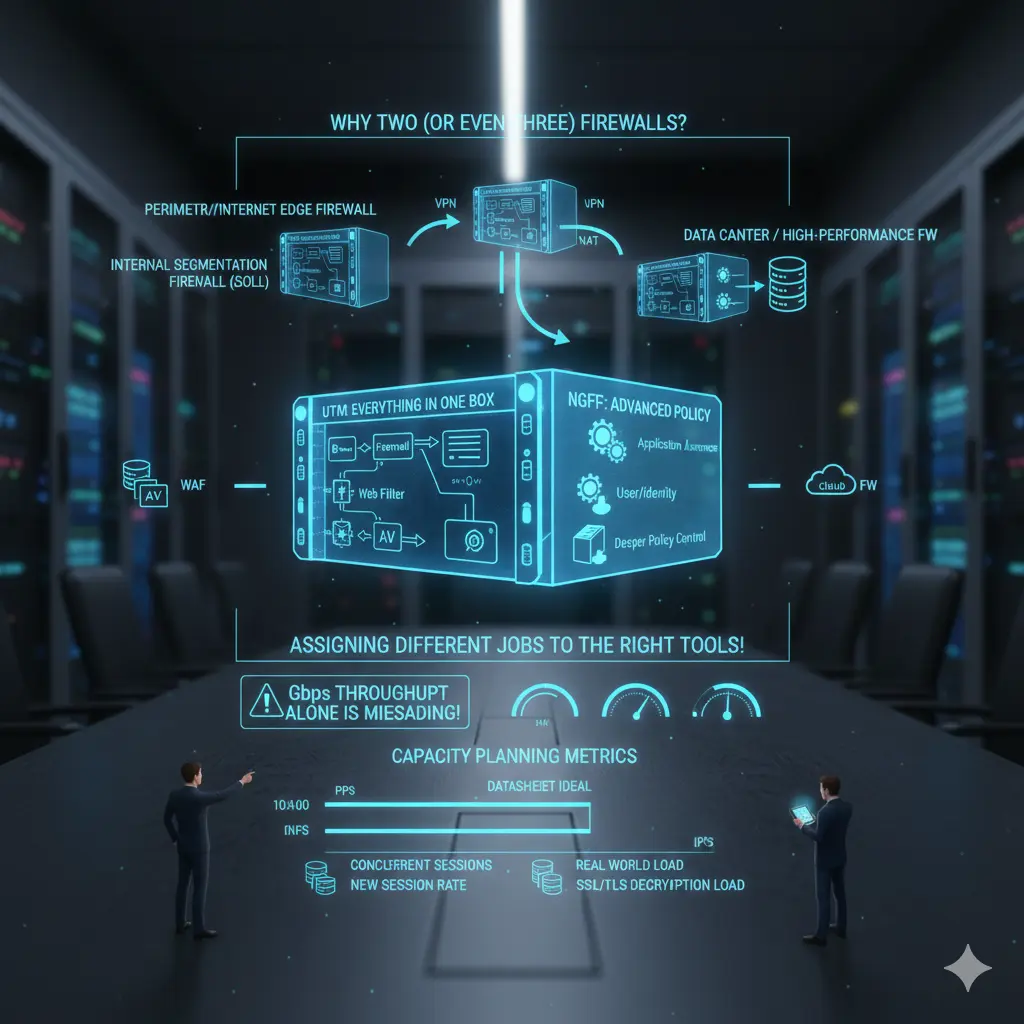
In many organizations, these scenarios are quite reasonable:
- Perimeter/Internet Edge Firewall: Internet egress, VPN, NAT, inbound/outbound policy.
- Internal Segmentation Firewall (ISFW): Internal segmentation, east-west control, critical zones.
- Data Center / High-performance FW: DC traffic, high session count, high PPS, low latency requirements.
- In some structures, specialized components like WAF or Cloud FW.
This doesn’t mean “buying two firewalls”; it means “giving two different jobs to the right tools.” When you pile everything into one box, you either lose performance, management, or security. Usually, one of the three inevitably goes.
And this leads us directly to capacity planning.
Firewall capacity planning: Throughput can lie on its own
The most dangerous mistake in firewall selection is looking only at the “Gbps throughput” figure. Because in real life, what kills a firewall is often not throughput but:
- PPS (packets per second)
- Concurrent session count
- New session rate
- NAT table and state
- Performance while IPS/AV/App-ID are active
- Heavy workloads like SSL/TLS decryption
- Log generation and transport (SIEM integration)
A real-world example: the sentence “We bought a 10 Gbps firewall” carries no meaning on its own. Because that 10 Gbps is an “ideal condition” measurement in most vendor datasheets. In your environment, if IPS, URL filtering, app control, and decryption are active, the real capacity changes dramatically. Therefore, the right question should be: “With the security features I will enable and my traffic characteristics, how much load can this firewall handle?”
If there is no answer to this question, the selection is risky.
Switching: It’s about load and role, more than port count
Switch selection often starts with port counts: how many copper ports, how many fiber ports, is there a need for PoE… These are certainly important, but from a core network perspective, they aren’t enough. Because a switch is not just a socket connecting endpoints; it is a decision point that determines where traffic will concentrate, where it will diverge, and where it will be carried upward.
The most common mistake made on the access switch side is planning ports based on today’s needs. However, the access layer is the fastest-changing layer in the network. A point that seems to have enough copper ports today might house a high-bandwidth AP, a camera, or a different edge device tomorrow. Therefore, the speed capability of copper ports (supporting 1G or 2.5G/5G), the sustainability of the PoE budget per port (not just total wattage), and the real capacity of uplinks become critical.
The uplink issue is often underestimated. You hear sentences like “2x10G uplink is enough,” but the traffic characteristics these uplinks will carry are rarely discussed. As the number of users at the access layer increases and east-west traffic and broadcast behavior change, uplinks can reach saturation much faster than expected. At this point, you shouldn’t just look at uplink speed, but also at the switch’s backplane capacity and oversubscription ratios. Because an uplink can be 10G, but if the internal architecture of the switch cannot sustain it, a bottleneck is inevitable.
[Image showing a comparison between a standard Access Switch and a high-density Data Center Spine/Leaf Switch]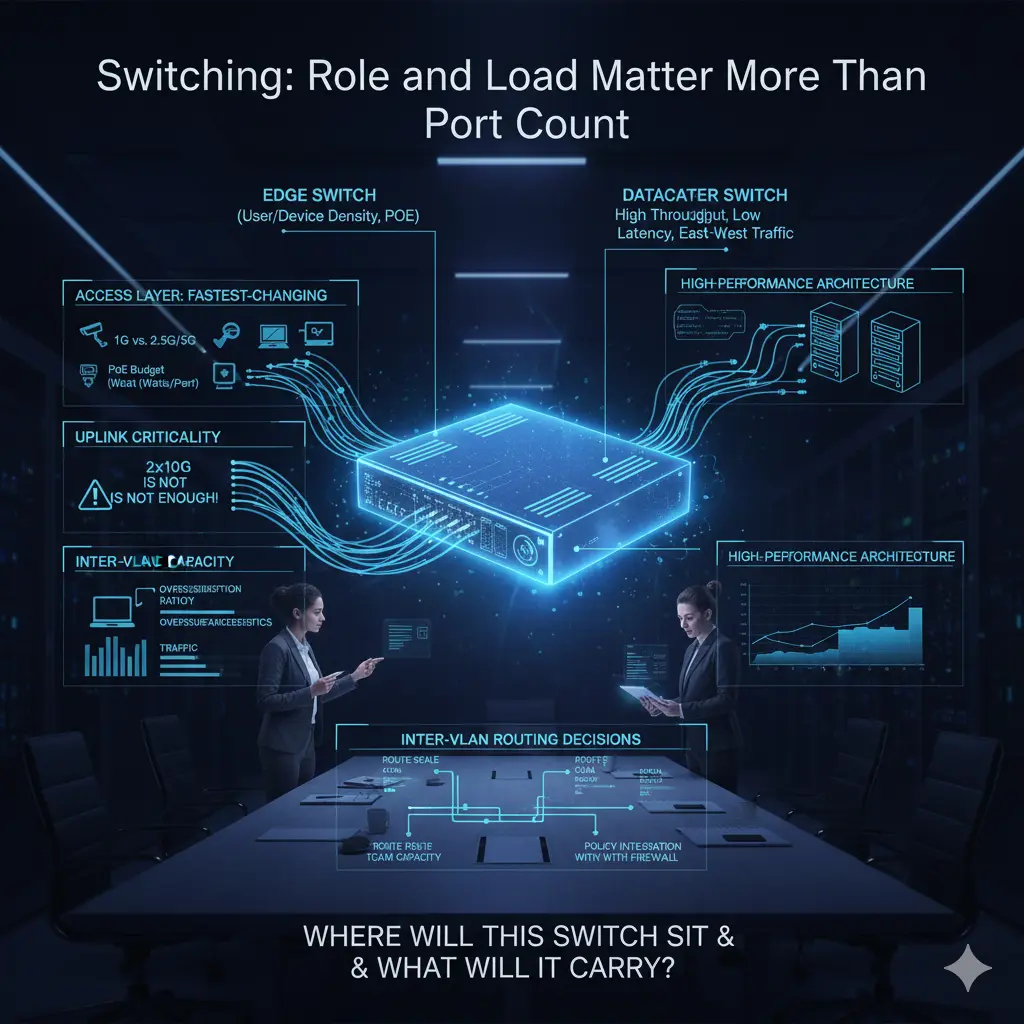
The distinction between an edge switch and a datacenter switch is also not clearly drawn in many projects. Edge switches are usually optimized for user and device density: high port counts, PoE, and access-oriented features. Datacenter switches, however, come with high throughput, low latency, high PPS, and architectures designed to handle east-west traffic. Expecting both roles from the same device usually either increases costs unnecessarily or drops performance below expectations. When designing a core network, the question “Where will this switch stand and what will it carry?” should come before “How many ports does it have?”
Inter-VLAN routing decisions are also directly related to switch selection. If routing is to be done on the switch, it’s not enough for the switch to just support L3; route scale, TCAM capacity, policy applicability, and how these decisions will integrate with the firewall must be considered. Otherwise, a design that looks like a performance gain initially can turn into an unmanageable mess later.
ACCESS / AP
Access / Wi-Fi: Uplink and control layers are part of the architecture, just like the radio
When talking about wireless networks, the focus usually shifts to the Wi-Fi standard: Wi-Fi 6, 6E, 7… However, in practice, wireless performance is often limited not by the air, but by the cable. No matter how powerful the access point is, if the uplink behind it cannot carry it, theoretical speeds mean nothing.
Today, many enterprise APs cannot use a significant portion of their potential when limited by a 1 Gbps uplink. Therefore, 2.5G and 5G copper uplink support is not a “luxury” but a direct design requirement, especially in environments with high user density. However, the chain must not break here: the AP might support 2.5G, but if the switch port it connects to doesn’t, the entire investment is wasted. AP and switch selection should therefore be done together, not separately.
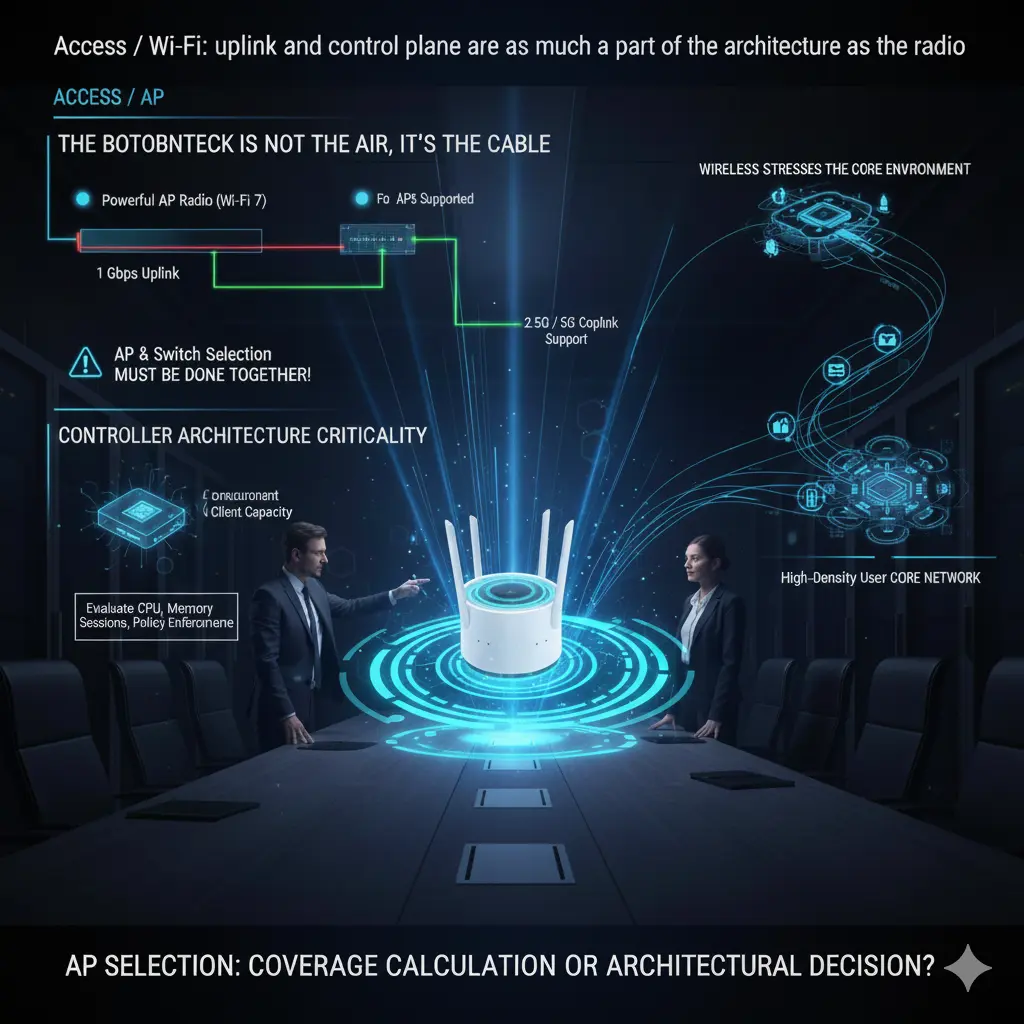
Another critical issue in the Wi-Fi side is controller architecture. The number of APs the controller supports, the simultaneous client capacity, and roaming behavior determine the real-life stability of the network. A controller that says “supports 500 APs” on paper can struggle much earlier than expected in a high-density environment requiring fast roaming. Controller capacity should be evaluated not just by the number of licenses, but together with CPU, memory, session handling, and policy enforcement capacity.
Furthermore, wireless networks are often thought of as the “edge,” but in reality, they are the layer that strains the core network the fastest. Users are mobile, connections are frequently dropped and re-established, and the authentication and policy enforcement cycle is much more intense than in wired networks. Therefore, a small design error at the access layer creates unexpected loads on the core network. AP selection is not just a coverage calculation; it is an architectural decision that directly affects core network behavior.
Conclusion: Manufacturer Selection, Architectural Maturity, and Realities
At this point, I want to emphasize: what I mention below is based entirely on my personal field experiences and observations. My intention is not to praise or criticize a manufacturer, but to openly state where they are strong and where they struggle. Because core network design is done with real needs and operational realities, not brand fanaticism.
Starting with Cisco is natural. They are still one of the strongest players in the industry on the switching and routing side. Especially in large and complex structures, they have significant maturity in campus and datacenter switching. They have been strong in wireless for many years; there is a serious ecosystem and experience pool in this area. On the firewall side, they have shown significant development, especially after the Asian market and acquisitions like Sourcefire; they are now in a more competitive position on the NGFW side.
However, it must be stated clearly: when you choose Cisco for all products, the integration of these products can often be exhausting and troublesome for an admin. Everything is possible, but it’s often not “easy”; it requires significant effort and experience on the integration side.
The HPE Aruba side, which I have followed closely for about ten years, offers a different story. When I first entered this ecosystem, the product range was quite limited. Over time, with HP’s acquisitions of Aruba, the portfolio expanded; today, with the addition of the Juniper product family, the range is growing significantly. On the switching side, the Aruba family has a very widespread and affectionate user base. On the wireless side, influenced by its Aruba roots, in my personal opinion, they have one of the strongest Wi-Fi solutions in the industry.
There were gaps in routing in the past; however, I believe this gap will be largely closed with the Juniper product family. On the other hand, the absence of its own strong firewall product family causes them to remain somewhat incomplete in this area.
The Fortinet side offers a very wide product range. Being able to offer a complete solution “under one roof” across firewall, switching, and wireless is a significant advantage for many organizations. Since Fortinet’s roots are in security, they are known to be very strong on the firewall side. The switching product family began to mature relatively late; thus, it took time to become widespread, but we have started to see it more frequently in the field in recent years.
In my opinion, one of the biggest pluses of the Fortinet ecosystem is its ease of use and interface. The integration of products is relatively less painful, which can significantly reduce operational load. This difference is very clearly felt, especially in organizations with limited IT teams.
When we come to the Palo Alto Networks side, the picture is clearer: Palo Alto is very strong in firewalls and is undisputedly one of the leading manufacturers in this field. However, they consciously do not enter areas like switching or wireless; it’s not their focus anyway. Many organizations choose Palo Alto only on the firewall side, and there are very logical reasons for this.
I think Palo Alto creates a significant difference in areas like application visibility, policy depth, and especially SASE. The fact that they are one of the world’s largest cybersecurity manufacturers today is no coincidence. It is quite natural for many organizations looking for the “best” on the firewall side to turn to Palo Alto.
In real life, companies can make very different choices for these three basic product groups. Some organizations prefer to proceed with a single manufacturer: let the switch, wireless, and firewall be from the same brand; let integration and support come from a single point, so that the contact is clear when a problem arises. Some organizations use one manufacturer on the firewall side and another for the switch and wireless. In even more mature structures, it’s common to see each layer chosen from different manufacturers.
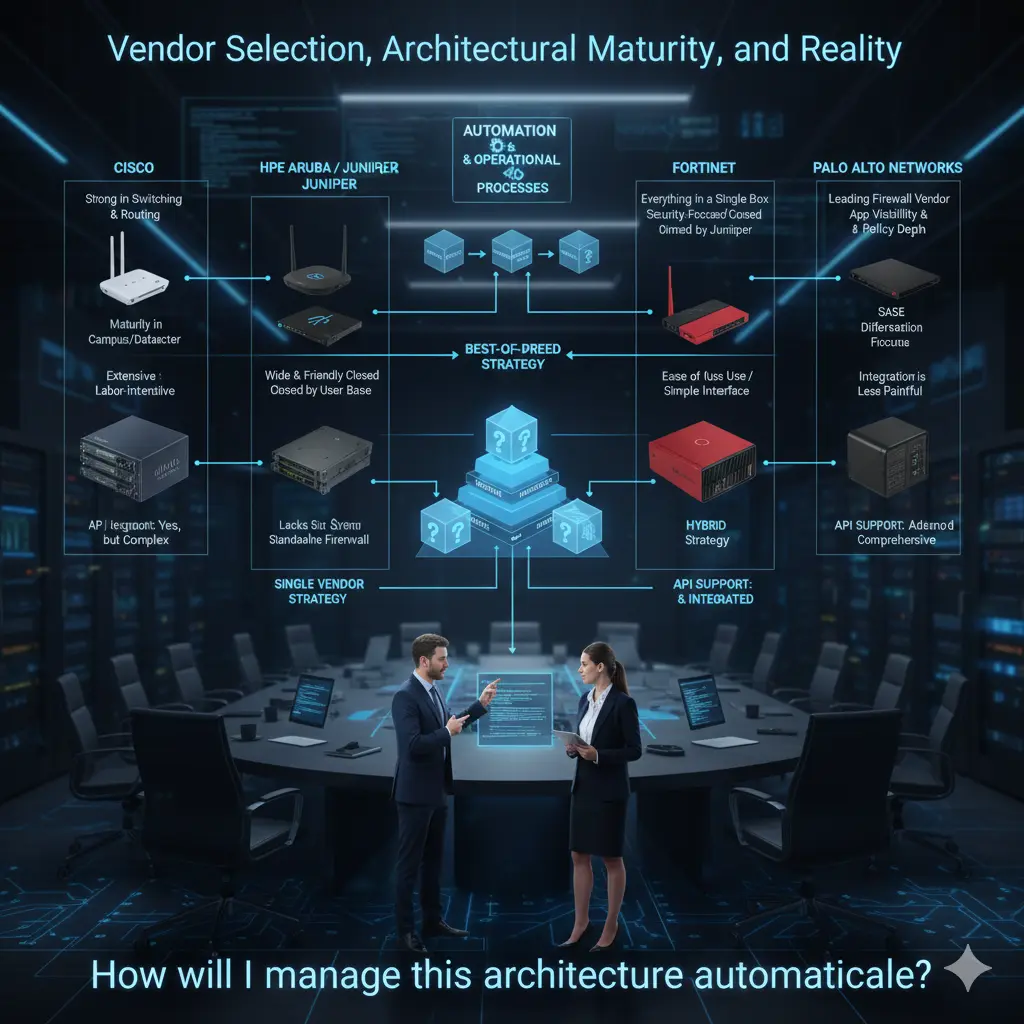
These choices are as much organizational as they are technical. The organization’s view of IT, team structure, habits of the network team, and past experiences significantly affect these decisions. There is no single right answer here.
My personal view is this: there are manufacturers that have proven themselves more in each field, and if the IT team is mature enough to manage this distinction, choosing different layers from different manufacturers can produce much stronger results technically. On the other hand, some organizations do not want to deal with integration issues, installation complexity, and configuration errors, so they prefer to proceed with a single manufacturer and solve all problems through a single support channel. This is also a completely valid approach.
Finally, there is a point I want to underline especially: today, almost all major manufacturers are investing heavily in automation. At this point, API support for products is no longer an “extra,” but a direct selection criterion. What can be done via API, what can be automated, and how open the integration is must be on the table when choosing a product.
As I mentioned in my first article, I believe product selection should not be thought of as a layer added later to automation processes. On the contrary, automation and operational processes should be placed at the top of the pyramid; products should be selected according to this framework. The question of which switch, which firewall, which AP should come after the question “How will I manage this architecture automatically?” In my opinion, correct core network design starts exactly here.
The Server Room and Cabling: The Reality No One Wants to Talk About But Everyone Pays For
In network projects, the topics most talked about are usually the “shiny” ones: which switch, which firewall, which wireless solution… But a significant portion of the problems experienced in the field starts at a much more basic place: server room design and cabling infrastructure.
I have seen a reality multiple times over the years: no matter how good the products you choose or how correctly you construct the architecture, if the server room and cabling infrastructure are weak, that network will eventually produce problems. And these problems usually appear as “network failures,” but the root cause is never actually the network.
The server room is still treated as an “equipment room” in most organizations. Initially, a few racks are placed in a small area; as things grow, new devices are added to the same room, cables are piled on top of each other, and temporary solutions become permanent. After a point, an area is created that no one wants to touch, but everyone depends on. This is exactly where the real risk begins.
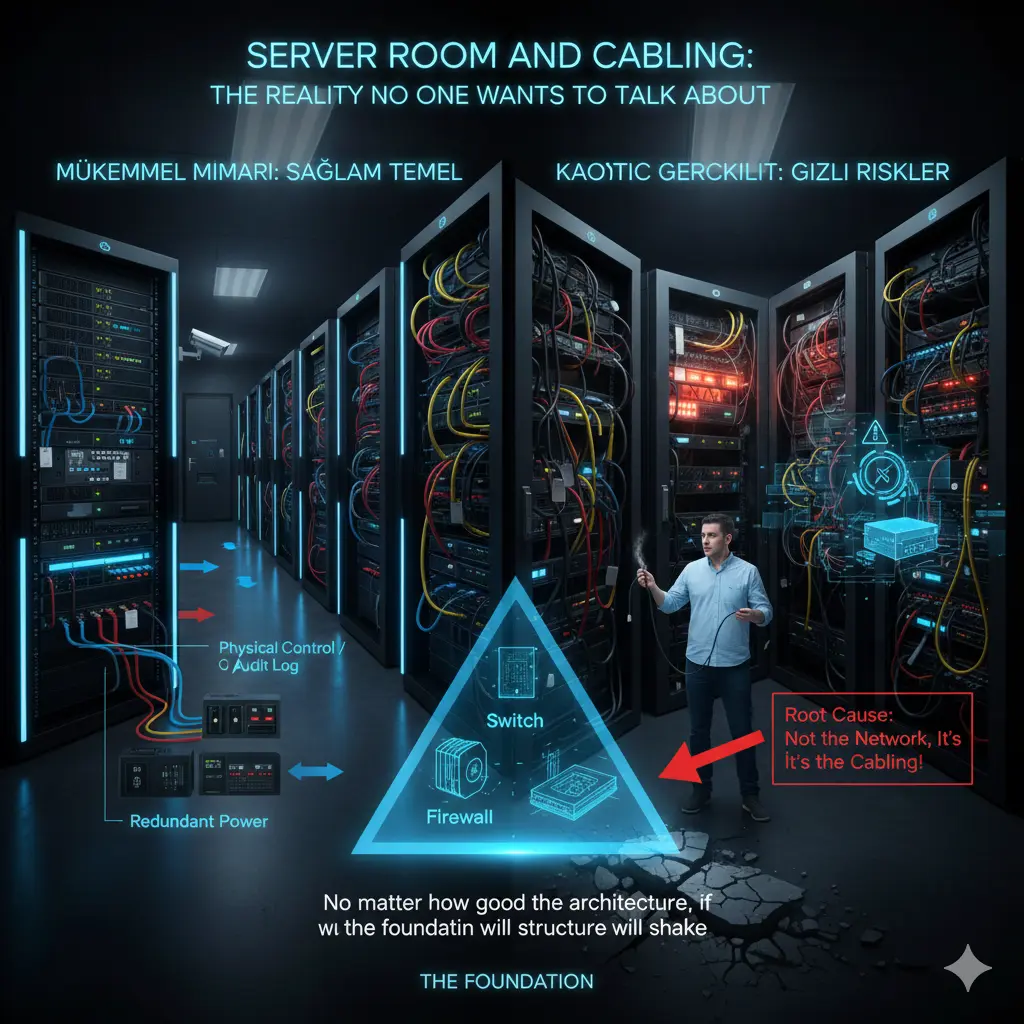
A server room is not just a place where devices sit. That room is the heart of the network. Heat, energy, airflow, accessibility, and order; all must be considered together. For example, the issue of cooling is often realized too late. Devices seem to be working, but working continuously at high temperatures seriously affects both performance and hardware lifespan. Sudden reboots, unexpected freezes, or “intermittent” errors often reveal inadequate cooling as the root cause.
Energy is similarly underestimated. Devices with redundant power supplies are bought, but it is not checked whether these power supplies actually go to different energy lines. It is said there is a UPS, but no capacity calculation is done. It is not clear how long systems will stay up during a power outage. These may seem like small details on paper, but they render the entire architecture meaningless in a crisis.
Cabling infrastructure is generally thought of as “done once and forgotten.” Yet, cabling is the longest-lasting part of the network. You change the switch, the firewall, the access point; but the cable remains there. Therefore, one of the biggest mistakes made is cabling according to today’s needs. An infrastructure planned for 1G today will reach a serious limit tomorrow with APs requiring 2.5G/5G uplinks or edge devices requiring higher speeds.
Where and for what purpose fiber and copper cables will be used is also an architectural decision. Just pulling fiber everywhere because “fiber is faster” is not correct either; there are still many areas where copper is advantageous, requiring PoE or for short-distance connections. The real issue is designing the cabling to allow for future expansion. Patch panel layout, cable labeling, intra-rack and inter-rack cable management… These are not aesthetic issues; they are directly operational issues.
Every change made in a poorly labeled cabling infrastructure is a risk. You might affect the wrong device while closing a port, or drop another service while unplugging a cable. Then it’s talked about as “the network is down again.” Yet, the problem is not the network, but the sloppy cabling done years ago.
The physical security of the server room is also often ignored. If it is not clear who can enter this room, who has access at what hours, or how changes made are recorded, even the best security policies lose their meaning at some point. In an environment where you cannot control physical access, talking about logical security usually remains theoretical.
In my view, the server room and cabling are not the “lower layer” of core network design; they are the foundation. No matter how sophisticated the solutions you put on top, if the foundation is weak, the structure will shake. Therefore, when designing a network, you should look not only at diagrams but also at the physical environment where those diagrams will come to life. Rack layout, cable paths, energy, and cooling plans; all of these are part of the architecture.
These topics are usually not exciting, they don’t take up much space in presentations, and they are hard to put on a CV. But the reality is that behind a well-functioning network, there is usually a well-designed server room and a clean cabling infrastructure. No one notices it; because problems don’t arise. And to me, that is the greatest praise an infrastructure design can receive.
Note
This article was originally published on Substack in a shorter, more narrative form.
This version expands on the architectural foundation of the series.
👉 Read the article on Substack: Click Here