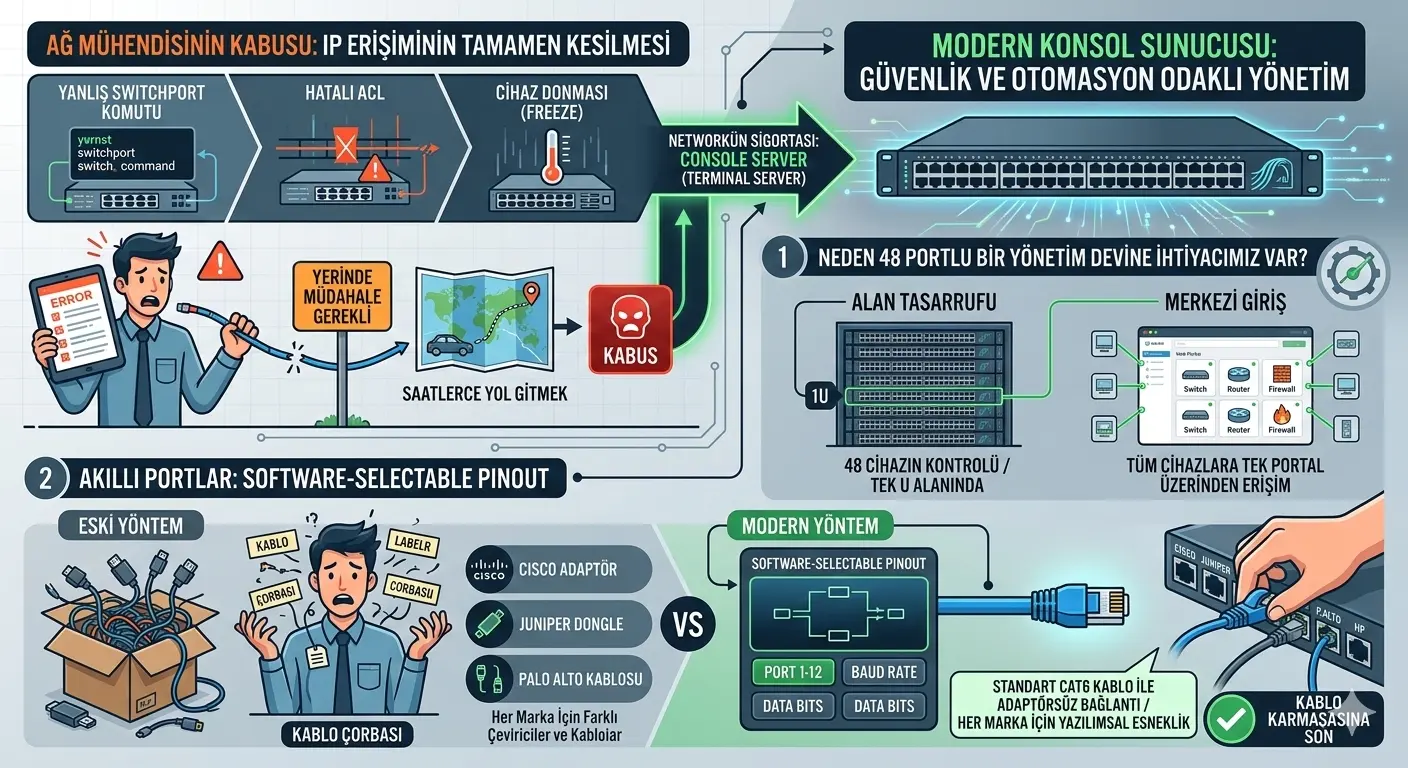
A network engineer’s biggest nightmare is the complete loss of IP access to a critical device at a remote location. A wrong switchport command, a faulty ACL, or a device freeze… In these cases, when you cannot reach the management IP, you are forced to travel for hours for “on-site intervention” or send someone else. This is exactly where the Console Server (Terminal Server), the “insurance” of the network, comes into play.
However, today these devices have evolved into security and automation-oriented professional management platforms that offer much more than a simple serial port multiplexer.
1. Why Do We Need a 48-Port Management Giant?
In enterprise-level data centers, dozens of switches, routers, firewalls, and servers are located in the same cabinet. A 48-port console device allows you to manage an entire cabinet via a single IP, optimizing physical space and ending cabling chaos.
- Space Saving: Taking console control of 48 devices in a single U (unit) space simplifies the intra-cabinet architecture.
- Centralized Entry: By providing access to all devices through a single portal, you minimize management complexity.
2. Smart Ports: Software-Selectable Pinout for Every Device
Every manufacturer (Cisco, Juniper, HP, Palo Alto, etc.) has different console standards and pinouts. We used to have to carry different adapters (dongles) or custom-made cables for every brand. The greatest strength of modern console servers is the Software-Selectable Pinout feature:
- Software Flexibility: Different Baud Rate, Data Bits, and most importantly, Pinout settings can be defined independently for each port.
- Adapter-free Connection: Thanks to software pinout, you can connect to any brand with a standard CAT6 cable without the need for complex converter adapters. This is the ultimate and most elegant solution to “cable soup” chaos.
3. Flexible Access: HTML5 Web CLI and Software Integration
Diversity in access methods provides engineers with tremendous agility during a crisis:
- Java-Independent HTML5 Support: Say goodbye to the clunky Java applications that were the biggest problem with old-gen devices. You can now open secure and high-speed CLI sessions directly through modern web browsers without installing any applications.
- SecureCRT and SuperPutty Integration: Fully compatible with your favorite CLI software. You can connect to devices over SSH tunnels with a single click through terminal emulators you are used to, managing your sessions professionally. This integration is vital for bulk-pasting complex command sets.
4. Security and Role-Based Access Control (RBAC & TACACS+)
The console port is the “backdoor” of a device, and this door must be protected at the highest level. Someone connecting to a device via console that cannot be reached over IP is touching the very heart of the device.
- Centralized Authorization: Centralized management is provided through TACACS+, RADIUS, or LDAP integration. You can track who entered which port, at what time, and for how long, second by second.
- Role-Based Access (RBAC): Define permissions only for the ports each user is responsible for. For example, let the security team see only Firewall consoles, while the systems team accesses only server consoles.
- Advanced API Support: Bulk commands can be sent to devices via API, or configurations can be automated based on instantaneous conditions.
5. Automation and Traceability: CLI Logging & Config Backup
A console server is no longer just a bridge; it is a recording and post-mortem analysis center:
- Automatic CLI Output Logging: All CLI outputs flowing on the console screen are automatically recorded. When a device crashes or gives a Kernel Panic, you cannot see the logs at that moment because the device has no IP access. However, since the console server records this stream, you can analyze the device’s last “cries” before the crash and find the root cause in seconds.
- Automatic Configuration Backup: Both the console device’s own settings and the critical configurations of the devices it manages are periodically backed up. This is part of the Network Infrastructure as Code (NIAC) vision.
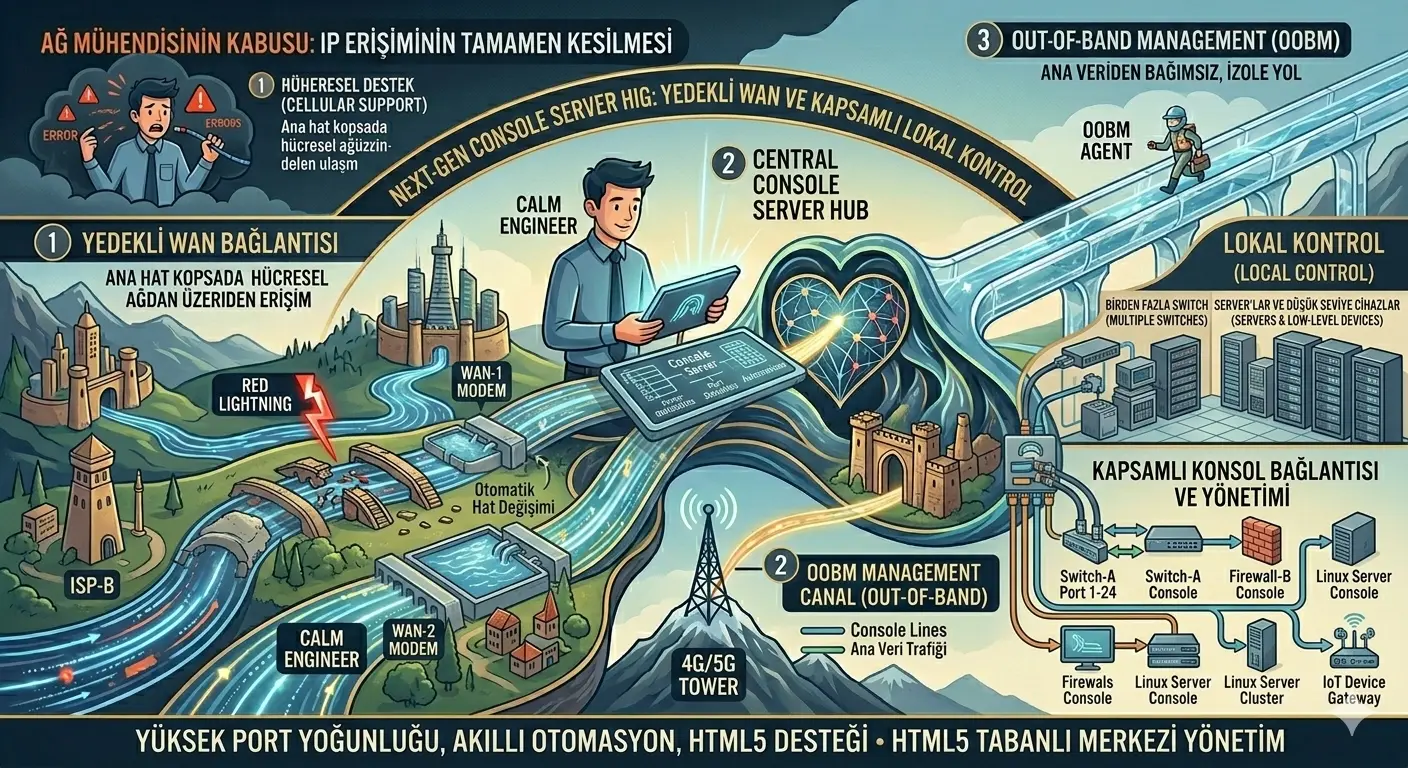
6. Uninterrupted Access: Dual WAN and Out-of-Band (OOBM) Architecture
If the network has completely collapsed, how will you reach the console server? This is where real “engineering” begins:
- Dual WAN & Cellular Support: With two independent internet inputs or internal 4G/5G LTE modules, you continue to reach devices over the cellular network even if your main internet line is cut.
- Out-of-Band Management (OOBM): This isolated path, established over a different service provider completely independent of main data traffic, is the only lifebuoy that gives you a chance to intervene even when the main network is completely “down.”
7. Market Leaders
The following brands set the market standards in high port density, smart automation features, and HTML5 support:
- Opengear: At the top with smart OOBM and high-security features.
- Lantronix: Known for flexible port structures and ease of management.
- Avocent (Vertiv) & Perle: Indispensable for professional data centers with their stable hardware.
Conclusion
The console server is the invisible protector of a complex infrastructure. These features, ranging from SecureCRT integration to automatic CLI logging, and from adapter-free connection to Java-independent HTML5 support, turn crisis moments into manageable operations.
Remember; the best network is the one that always has a “Plan B.”
How actively do you use SecureCRT or SuperPutty integration in remote location management? Is your rapid intervention strategy via web without Java dependency ready?
#NetworkEngineering #ConsoleServer #OOBM #DataCenter #NetworkSecurity #TACACS #Automation #SecureCRT #SuperPutty #HTML5 #Opengear #Lantronix #RemoteAccess #NetOps #NIAC