F5 LTM Deep Dive: Virtual Servers, iRules, SSL Offloading & HA
This article is part of the F5 BIG-IP series.
New to F5? Start with the platform overview first: F5 BIG-IP Is Not a Load Balancer — It’s an Application Delivery Platform
If you already know the big picture and want to go deep on LTM — configuration, iRules, migration field notes — you’re in the right place.
The Full-Proxy Architecture: Why It Changes Everything
The most important thing to understand about LTM is that it is a full-proxy. This is not a marketing term — it has direct operational consequences that distinguish LTM from every simpler load balancer.
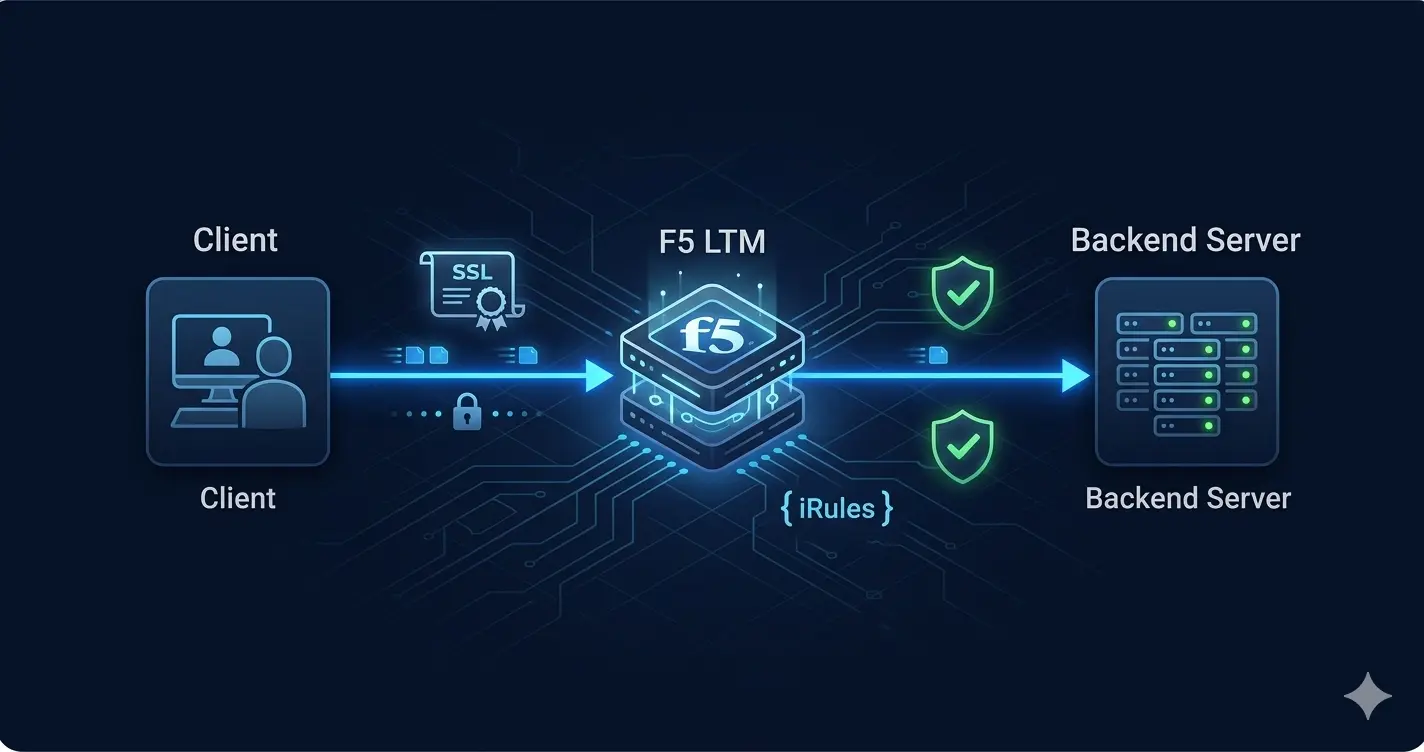
When a client connects through F5 LTM, there are two completely separate TCP connections:
Client ──[TCP connection 1]──→ F5 LTM ──[TCP connection 2]──→ Backend Server
         (Virtual Server IP)             (Pool Member IP)
F5 terminates the client connection completely, inspects it, makes all routing and policy decisions, then opens a new connection to the backend. The client and backend server never communicate directly.
This gives LTM capabilities that pass-through load balancers cannot provide:
- Full visibility into every byte of the request and response
- Ability to rewrite any part of the traffic — headers, URIs, cookies, response bodies
- SSL termination on behalf of backends — backends see plain HTTP
- Independent TCP tuning for client-facing and server-facing connections
- Connection multiplexing and HTTP pipelining optimizations
In practice, the full-proxy position means that problems upstream (client-side) and problems downstream (server-side) are completely isolated. This dramatically simplifies troubleshooting in production incidents.
Virtual Servers: The Entry Point
A Virtual Server is the IP address and port combination that clients connect to. It is the primary object in LTM and the container for all traffic policy:
Virtual Server: vs_webapp_443
  Destination IP:     10.10.1.100
  Port:               443
  Protocol:           TCP
  HTTP Profile:       http_profile_xforward
  SSL Client Profile: clientssl_webapp
  SSL Server Profile: serverssl_backend
  Default Pool:       pool_webapp_8080
  Persistence:        cookie_persistence
  iRule:              /Common/rule_uri_routing
One VIP, multiple applications: A single virtual server IP can serve multiple applications using iRules to route based on HTTP Host header or URI path. This reduces IP consumption and simplifies upstream firewall rules.
Virtual server state is independent of pool health: If a virtual server is disabled, no traffic reaches the pool — regardless of whether pool members are healthy. Always monitor virtual server availability separately from pool member availability.
Three virtual server types:
- Standard — full proxy, the most common type
- Performance Layer 4 — bypasses the proxy for high-throughput scenarios where L7 inspection is not needed
- Forwarding — pass-through routing without proxy behavior, used for transparent deployments
Pools and Load Balancing Methods
A Pool is the group of backend servers the virtual server distributes traffic to:
Pool: pool_webapp_8080
  Load Balancing Method: Least Connections (member)
  Slow Ramp Time:        30 seconds
  Monitor:               http_monitor_webapp
  Members:
    192.168.10.11:8080   Priority Group: 1
    192.168.10.12:8080   Priority Group: 1
    192.168.10.13:8080   Priority Group: 2  ← standby, activates only if group 1 fails
Load balancing methods compared:
- Round Robin — sequential distribution. Works for stateless, uniform workloads. Poor choice when connection durations vary significantly.
- Least Connections (member) — sends to the member with fewest active connections. Best for applications with variable session lengths. Standard choice in most production environments.
- Least Connections (node) — counts connections across all pools to a server IP, not just this pool. Use when a server participates in multiple pools.
- Ratio — weighted distribution. Member A gets 3× more connections than Member B. For servers with different capacities.
- Fastest — sends to the most recently responsive member. Can create hot spots; use Observed instead for more stability.
Slow Ramp Time is underused but important. When a pool member recovers from failure, it is immediately available — but may not be fully warmed up (JVM, caches, database connection pools). Slow Ramp Time gradually increases the weight of a newly available member over the specified seconds, preventing a cold server from being immediately flooded.
Priority Groups allow active and standby member sets within one pool. Group 1 members receive all traffic while above the minimum active members threshold. Group 2 members activate automatically when Group 1 falls below threshold. This replaces the need for separate active and standby pools.
Health Monitors: More Important Than Load Balancing Method
A pool member can be TCP-reachable and completely broken at the application level. A payment processing server returning HTTP 500 on every request is still TCP-reachable — a basic TCP monitor will never detect the problem.
This is the most common failure scenario I’ve seen in production environments, and the most common place where teams underinvest.
TCP Monitor: Necessary but Insufficient
Monitor: tcp_monitor_basic
  Type:      TCP
  Interval:  5 seconds
  Timeout:   16 seconds
Detects: network connectivity loss, server crashes, port not listening.
Does not detect: application errors, database connection failures, memory exhaustion, partially-initialized application states.
HTTP Monitor: The Production Standard
Monitor: http_monitor_webapp
  Type:           HTTP
  Send String:    GET /health HTTP/1.1\r\nHost: webapp.internal\r\nConnection: close\r\n\r\n
  Receive String: "status":"healthy"
  Interval:       5 seconds
  Timeout:        16 seconds
LTM marks the member UP only when the response body contains the exact expected string. The application must actively confirm it is healthy — not just that the port is open.
A good /health endpoint checks: database connectivity, cache availability, key dependency status, and disk space if relevant. An application returning HTTP 200 with {"status":"degraded"} should fail the monitor check.
HTTPS Monitor for Encrypted Backends
Monitor: https_monitor_webapp
  Type:         HTTPS
  SSL Profile:  serverssl_monitor (configure to accept self-signed certs internally)
  Send String:  GET /health HTTP/1.1\r\nHost: webapp.internal\r\n\r\n
  Receive String: "status":"healthy"
The Timeout Formula
A frequent misconfiguration: setting timeout ≤ interval. The correct formula:
Timeout = (Interval × retries) + 1
With Interval=5 and 3 retries: Timeout = 16. This gives LTM time to retry before marking the member down, avoiding false positives from transient network blips.
SSL Offloading and SSL Bridging
SSL Offload (Client SSL only)
Client ──(HTTPS/TLS 1.3)──→ F5 LTM ──(HTTP)──→ Backend
F5 terminates TLS from the client and forwards unencrypted HTTP to backends. Maximum backend CPU savings. Requires a Client SSL Profile on the virtual server:
Client SSL Profile: clientssl_webapp
  Certificate:   /Common/webapp_cert
  Key:           /Common/webapp_key
  Chain:         /Common/intermediate_ca
  Ciphers:       TLSv1.2:TLSv1.3
  Options:       No TLSv1, No TLSv1.1
SSL Bridging (Client + Server SSL)
Client ──(HTTPS/TLS 1.3)──→ F5 LTM ──(HTTPS/TLS)──→ Backend
F5 decrypts, inspects, then re-encrypts for the backend. Required in regulated environments (banking, healthcare) where compliance mandates end-to-end encryption. Adds some latency — two TLS handshakes per connection — but provides full compliance and visibility.
In the banking environment, all production virtual servers ran SSL bridging. Every connection was decrypted, inspected by WAF, and re-encrypted to the backend.
Certificate Management
Key operational points:
- F5 does not alert by default when certificates approach expiry. Set up external monitoring (SolarWinds, Zabbix) to check certificate expiry on virtual servers.
- Certificate replacement is zero-downtime: update the certificate object, the profile references it automatically.
- SNI allows a single VIP to serve multiple applications with different certificates — each SSL profile is matched to the appropriate server name.
Session Persistence
Cookie Persistence (Recommended)
F5 inserts a cookie identifying the pool member into the HTTP response:
Persistence Profile: cookie_persistence
  Method:      Insert
  Cookie Name: BIGipServer_webapp
  Expiration:  Session
  Encrypt:     Enabled
On subsequent requests, the browser sends this cookie. F5 routes to the correct member regardless of current load distribution. Transparent to the application, works through NAT, survives client IP changes.
Source Address Persistence
Routes all traffic from the same client IP to the same member:
Persistence Profile: source_addr_persistence
  Timeout: 3600 seconds
Simple, but problematic when many users share a NAT IP — all users behind the same NAT hit the same backend server, breaking load distribution.
iRule-Based Universal Persistence
For custom session identifiers (non-standard cookies, URL parameters, custom headers):
when HTTP_REQUEST {
  persist uie [HTTP::header "X-Session-Token"]
}
Persists based on a custom header value — something no standard profile supports.
iRules: The Programmable Traffic Layer
iRules are Tcl-based scripts executing in the TMOS data plane at wire speed. They are the most powerful LTM differentiator — traffic logic that would otherwise require application code changes.
Event Model
iRules execute on events in the traffic lifecycle:
HTTP_REQUEST— complete HTTP request received from clientHTTP_RESPONSE— response received from backendCLIENT_ACCEPTED— TCP connection from client establishedSERVER_CONNECTED— F5 connected to backendSSL_HANDSHAKE_START— during TLS negotiation
Production iRule Examples
Client IP forwarding to backend:
when HTTP_REQUEST {
  HTTP::header insert "X-Forwarded-For"   [IP::client_addr]
  HTTP::header insert "X-Real-IP"         [IP::client_addr]
  HTTP::header insert "X-Forwarded-Proto" "https"
}
URI-based pool routing:
when HTTP_REQUEST {
  if { [HTTP::uri] starts_with "/api/v2/" } {
    pool pool_api_v2_servers
  } elseif { [HTTP::uri] starts_with "/api/" } {
    pool pool_api_v1_servers
  } elseif { [HTTP::uri] starts_with "/admin/" } {
    pool pool_admin_servers
  } else {
    pool pool_web_servers
  }
}
Maintenance redirect when pool is empty:
when HTTP_REQUEST {
  if { [active_members pool_webapp_8080] < 1 } {
    HTTP::redirect "https://status.company.com/maintenance"
  }
}
Host header-based routing — multiple applications on one VIP:
when HTTP_REQUEST {
  switch [HTTP::host] {
    "app1.company.com" { pool pool_app1 }
    "app2.company.com" { pool pool_app2 }
    "api.company.com"  { pool pool_api  }
    default            { pool pool_default }
  }
}
Connection rate limiting by client IP:
when CLIENT_ACCEPTED {
  set conn_limit 50
  if { [table lookup -notouch [IP::client_addr]] > $conn_limit } {
    reject
  } else {
    table incr [IP::client_addr]
    table timeout [IP::client_addr] 60
  }
}
iRule Performance Notes
iRules execute for every connection or request through the virtual server. Guidelines:
- Avoid complex string operations in high-traffic iRules — use
tableto cache computed values - A syntax error disables the entire iRule silently — test in staging first
- Use
log local0.debugsparingly in production — excessive logging impacts performance - The
RULE_INITevent runs once at startup and is ideal for initializing shared data structures
High Availability: Active-Standby in Production
Device Groups and Traffic Groups
F5 HA uses Device Trust (mutual authentication between peers) and Device Groups (sync-failover configuration):
Device Group: dg_production
  Type:    sync-failover
  Members: bigip-01 (Active), bigip-02 (Standby)

Traffic Group: traffic-group-1
  Floating IPs: 10.10.1.100 (VIP), 10.10.1.1 (self IP)
  Active on:    bigip-01
Traffic Groups contain the floating IPs that migrate between devices during failover. When bigip-01 fails, bigip-02 takes ownership of traffic-group-1 and announces the VIP via gratuitous ARP.
The Dedicated Heartbeat VLAN: Non-Negotiable
F5 HA uses network failover — heartbeat packets between devices detect peer failure. The critical rule:
Always use a dedicated failover VLAN, separate from production and management networks.
Sharing the production interface for heartbeat creates false failover events during network congestion. Both devices believe the other has failed and both become active simultaneously — split-brain. Traffic is duplicated, sessions break, and the incident is painful to recover from.
Failover VLAN: vlan_ha_heartbeat
  Interface:         1.3 (dedicated)
  bigip-01 self IP:  192.168.100.1/24
  bigip-02 self IP:  192.168.100.2/24
Config Sync: Manual vs. Automatic
Automatic sync — changes made on the active device immediately propagate to standby. Risk: a partial or incorrect configuration change propagates before you can review it.
Manual sync — administrator triggers sync explicitly after verifying changes. Safer for production. Standard choice in regulated environments.
Connection Mirroring
By default, failover drops all existing connections — clients must reconnect. For most web applications, this is acceptable.
For long-lived connections (persistent WebSockets, large file transfers, database connections), connection mirroring maintains session state on the standby device. Failover resumes these connections with minimal disruption.
Enable connection mirroring selectively — it consumes memory and CPU on both devices. Not every virtual server needs it.
Field Notes: The 2000 → 5000 Migration
Why We Migrated
BIG-IP 2000 series had reached its SSL offloading ceiling at banking peak hours. TMOS 13.x was approaching end of support. The 5000 series offered hardware SSL acceleration, 6× throughput improvement, and TLS 1.3 support via TMOS 15.x.
Zero-Downtime Approach: 30+ Devices, 0 Outages
Phase 1 — Parallel deployment Install 5000 series hardware alongside existing 2000 series. Configure identical virtual servers, pools, profiles, and iRules on new devices. Zero traffic yet.
Phase 2 — Validation on non-critical virtual server Route a single internal application to the new device. Monitor for 72 hours: connection rates, SSL handshake latency, health monitor behavior, iRule execution logs, HA failover test under synthetic load.
Phase 3 — Progressive migration by business risk Migrate virtual servers in groups — internal tools first, general applications second, payment processing last. For each group:
- Update upstream routing / SNAT to point to new device
- Monitor 48 hours
- Keep old device as rollback for 72 hours per group
Phase 4 — HA pair completion After all virtual servers validated on new active device:
- Replace standby (old device) first
- Verify new standby syncs config from active
- Force failover — test new standby under production load
- Decommission old active
The rule that made it work: never replace both HA devices simultaneously. There must always be one fully validated, production-tested device handling traffic.
TMOS Compatibility Audit: Do This Before You Start
iRules written for TMOS 13.x do not always behave identically on 15.x. Before migration, audit all iRules for:
HTTP::commands — behavior changes in HTTP/2 scenariosSSL::events — new events and changed timing in TLS 1.3RULE_INITexecution — timing differences at startup
We found 3 iRules requiring modification before cutover. Finding these in staging saved hours of production incident response.
Key Takeaways
- LTM is a full-proxy — not pass-through. This distinction drives all its capabilities and troubleshooting approaches.
- Health monitors matter more than load balancing method. HTTP monitors that check application responses are always better than TCP monitors.
- iRules enable wire-speed traffic logic without application code changes — the most powerful LTM differentiator.
- SSL offloading removes encryption burden from backends. SSL bridging is required in regulated environments.
- Always use a dedicated heartbeat VLAN for HA. Shared interfaces cause split-brain.
- In migrations: standby first, then active. Never simultaneously.
This Series
- 📖 F5 BIG-IP Platform Overview — All Modules ← Start here if you’re new to F5
- 🌐 F5 GTM & GSLB Deep Dive
- 🛡️ F5 WAF Deep Dive
Related Articles
- 🛠️ The Backdoor of the Network: Next-Gen Console Server Architecture — Out-of-band access during F5 maintenance windows
- 🛡️ Network Packet Broker (NPB) Masterclass — Traffic visibility alongside ADC
- 🔐 The Zero Trust Mindset — Where LTM fits in a Zero Trust architecture