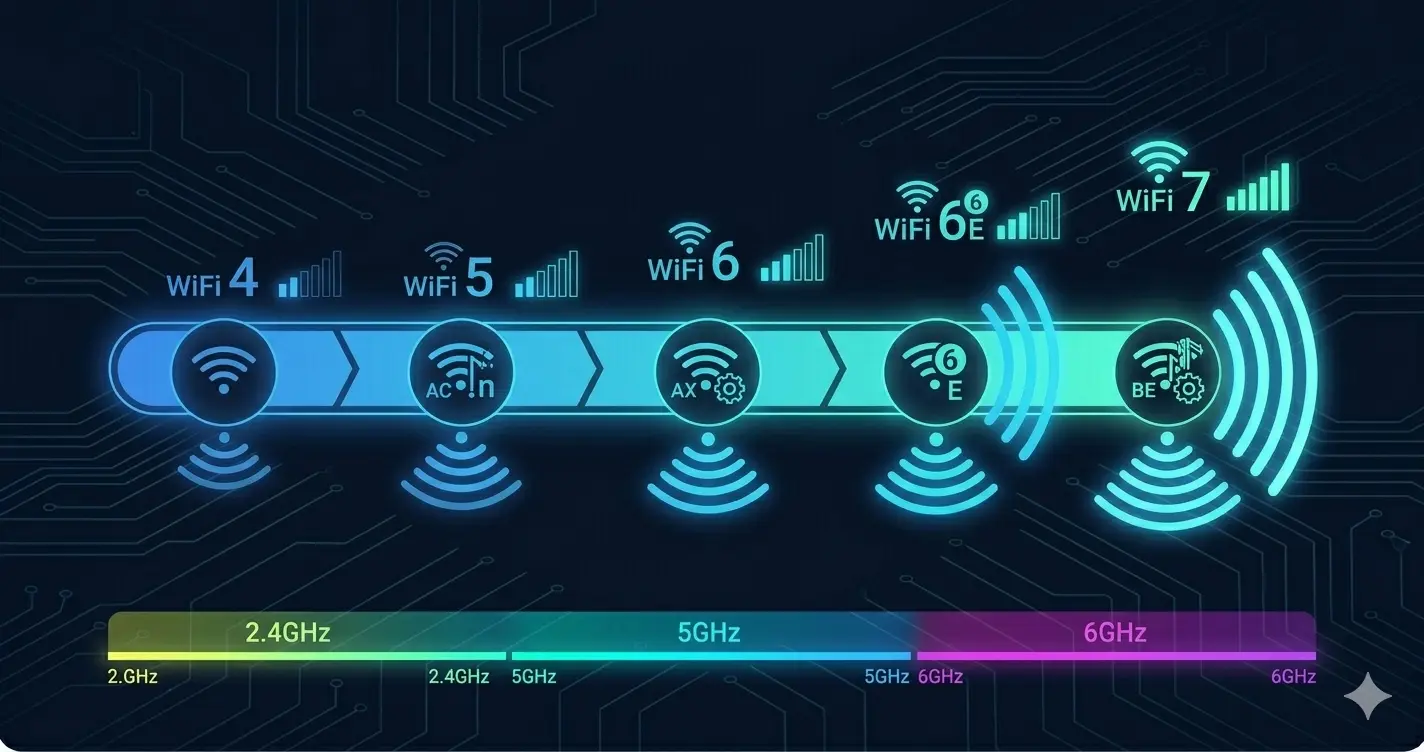
802.11 Standards Deep Dive: WiFi 4, 5, 6, 6E and What Actually Changed
This article is part of the Enterprise WiFi series.
New to enterprise wireless? Start with the overview: Enterprise WiFi Architecture: From Standards to Deployment
The Problem with Marketing Numbers
Every WiFi generation comes with impressive theoretical throughput numbers. 802.11ac promised 3.5 Gbps. 802.11ax promises 9.6 Gbps. In practice, a single client in a real environment rarely exceeds 400–600 Mbps on WiFi 5, and 800 Mbps–1.2 Gbps on WiFi 6.
This isn’t deception — the theoretical rates are mathematically accurate under ideal conditions. The gap between theory and practice exists because:
- Theoretical rates assume maximum channel width (160 MHz), maximum spatial streams (8), and maximum modulation (1024-QAM) — simultaneously
- Real clients have 1–2 spatial streams, not 8
- Channel width is limited by regulatory rules and interference avoidance
- Signal attenuation reduces modulation to lower rates as distance increases
What actually matters in enterprise wireless selection is not peak throughput — it’s how the standard behaves under load, in dense client environments, and in congested RF conditions. This is where the generations genuinely differ.
802.11n (WiFi 4): The Foundation
Released 2009. Introduced two technologies that remain fundamental:
MIMO (Multiple Input, Multiple Output): Multiple antennas on both AP and client transmitting and receiving simultaneously on the same channel. A 2×2 MIMO AP uses 2 transmit and 2 receive antennas, effectively doubling throughput compared to single-antenna (SISO) designs. Enterprise APs commonly use 3×3 or 4×4 MIMO.
5 GHz support: 802.11n was the first standard to operate on both 2.4 GHz and 5 GHz. The 5 GHz band has more non-overlapping channels (25 vs. 3 in 2.4 GHz in most regions) and less interference from neighboring networks and microwave ovens.
Channel bonding: 40 MHz channels (bonding two 20 MHz channels) doubled theoretical throughput at the cost of channel availability.
Practical reality in 2026: 802.11n hardware is end-of-life. Any new deployment should use at minimum 802.11ac. Understanding 802.11n is relevant for managing legacy devices that still exist in many enterprise environments.
802.11ac (WiFi 5): The Shift to 5 GHz
Released 2013 (Wave 1), 2016 (Wave 2). Significant improvements over 802.11n:
5 GHz only: 802.11ac operates exclusively on 5 GHz. This forced the 2.4 GHz band into legacy/IoT use and moved high-throughput clients to the less congested 5 GHz spectrum.
Wider channels: 80 MHz channels (Wave 1) and 160 MHz channels (Wave 2). An 80 MHz channel provides roughly 4× the data rate of a 20 MHz channel — but consumes 4× the spectrum. In dense deployments with many APs, 80 MHz channels cause severe co-channel interference. Many enterprise deployments use 40 MHz to preserve channel availability.
256-QAM: Higher modulation density than 802.11n’s 64-QAM. More bits per symbol at the same signal strength — but requires better signal quality.
MU-MIMO (Wave 2): 802.11ac Wave 2 introduced Multi-User MIMO for the downlink. Instead of transmitting to one client at a time (SU-MIMO), the AP can simultaneously transmit to up to 4 clients using spatial multiplexing — different beams directed at different clients.
The MU-MIMO limitation: Wave 2 MU-MIMO only works downlink (AP to client). The uplink (client to AP) is still single-user. Clients must be in spatially distinct positions for MU-MIMO to work effectively — in practice, the benefit is often less dramatic than theoretical.
Practical impact: WiFi 5 remains the most widely deployed enterprise standard. Most enterprise APs deployed between 2016 and 2021 are 802.11ac Wave 2. Performance is excellent for typical office workloads.
802.11ax (WiFi 6): Designed for Density
Released 2019. WiFi 6 didn’t primarily target faster single-client throughput — it targeted efficiency in high-density environments. This is the key distinction.
OFDMA: The Most Important WiFi 6 Feature
In 802.11n and 802.11ac, the channel is allocated to one client at a time. Even if a client only needs to send a small acknowledgment, it holds the channel while other clients wait:
WiFi 5 (OFDM — time division):
  Time: |─ Client A ─|─ Client B ─|─ Client C ─|─ Client A ─|
  Channel: 100% allocated to one client at a time
WiFi 6 introduced OFDMA (Orthogonal Frequency Division Multiple Access), borrowed from LTE/5G cellular. The channel is divided into sub-channels called Resource Units (RUs), and multiple clients can be served simultaneously in different RUs:
WiFi 6 (OFDMA — frequency + time division):
  Time: |─────────── Single TXOP ────────────|
        | Client A | Client B | Client C     |
        | (small)  | (small)  | (large data) |
  Channel: subdivided among multiple clients simultaneously
Why this matters in practice:
- IoT devices, phones, and tablets frequently send small packets (acknowledgments, keep-alives, sensor data). Under WiFi 5, each of these small transmissions holds the full channel.
- OFDMA allows the AP to batch these small transmissions, serving multiple clients in the time a single WiFi 5 transmission would take.
- In dense environments (conference rooms, classrooms, open offices), this dramatically reduces channel congestion and improves overall throughput for all clients.
OFDMA applies to both downlink and uplink in WiFi 6, unlike WiFi 5’s downlink-only MU-MIMO.
BSS Coloring: Reducing Co-Channel Interference
In dense AP deployments, neighboring APs often share channels. Under 802.11n/ac, a client device must wait any time it detects activity on its channel — even if that activity is from an AP in the adjacent building that cannot possibly interfere.
WiFi 6 BSS Coloring assigns a “color” (a numeric tag) to each Basic Service Set. Devices can distinguish between transmissions from their own BSS and transmissions from other BSSs sharing the same channel:
Without BSS Coloring:
  Client hears AP-1 (own network) → waits
  Client hears AP-2 (neighbor)    → also waits (unnecessary)

With BSS Coloring:
  Client hears AP-1 (same color)  → waits (relevant)
  Client hears AP-2 (different color, low RSSI) → transmits (reuse)
In practice, BSS Coloring improves spatial reuse in dense deployments — more APs can operate on overlapping channels without causing excessive interference.
Target Wake Time (TWT): IoT Battery Life
WiFi 6 introduced TWT, which allows APs to schedule specific wake times for IoT and battery-powered devices. Instead of keeping their radio active continuously waiting for data, devices sleep and wake only at scheduled intervals.
Enterprise relevance: Buildings increasingly have WiFi-connected sensors, cameras, access control readers, and asset tracking tags. TWT extends battery life dramatically for these devices without affecting their functionality.
1024-QAM and Higher Throughput
WiFi 6 supports 1024-QAM (vs. 256-QAM in WiFi 5) — encoding 10 bits per symbol vs. 8. Approximately 25% throughput improvement at close range with excellent signal quality. Less significant than OFDMA for most deployments.
802.11ax (WiFi 6E): The 6 GHz Band
WiFi 6E is 802.11ax extended to the 6 GHz band (5.925–7.125 GHz in most regions). The 6 GHz band provides:
- 1200 MHz of new spectrum — compared to 500 MHz available in 5 GHz
- Up to 59 non-overlapping 20 MHz channels — vs. 25 in 5 GHz (region-dependent)
- No legacy devices: The 6 GHz band is exclusively WiFi 6E/7. No 802.11n or 802.11ac devices exist there. No interference from older protocols.
- Wide channels without congestion: 160 MHz channels are practical in 6 GHz without the channel exhaustion they cause in 5 GHz.
The limitation: 6 GHz has shorter range than 5 GHz due to higher frequency attenuation. It’s excellent for high-density indoor environments where APs are close to clients. It’s less useful for outdoor or long-range deployments.
Client adoption: WiFi 6E capable clients (smartphones, laptops) are increasingly common as of 2026. Enterprise APs supporting 6E typically operate tri-band: 2.4 GHz (legacy), 5 GHz (mainstream), and 6 GHz (high-throughput, low-congestion).
802.11be (WiFi 7): Emerging
802.11be / WiFi 7 was finalized in 2024 and is in early enterprise deployment as of 2026. Key innovations:
Multi-Link Operation (MLO): A single client connection can simultaneously use multiple bands and channels — for example, transmitting on 5 GHz and 6 GHz simultaneously. This improves throughput aggregation and enables seamless roaming between bands without disconnection.
320 MHz channels: Available in 6 GHz. Doubles the channel width of WiFi 6E’s 160 MHz maximum.
4096-QAM: Higher modulation, requiring excellent signal conditions. ~20% throughput improvement at close range over 1024-QAM.
Enterprise readiness: WiFi 7 APs are available from Cisco, Aruba, and others. Client support is growing but not yet universal. For new deployments, WiFi 7 APs future-proof the infrastructure while remaining compatible with WiFi 5 and WiFi 6 clients.
Channel Planning: Where Theory Meets Reality
Understanding standards is only half the picture. How you configure channels determines whether your WiFi 6 deployment outperforms or underperforms your WiFi 5 deployment.
2.4 GHz: Only 3 Usable Channels
In most regions, 2.4 GHz has 14 channels defined but only 3 non-overlapping (channels 1, 6, 11). Any AP on channel 2, 3, 4, 5 is partially overlapping with channels 1 and 6 — causing interference.
In dense deployments, the 2.4 GHz band is essentially unusable for high-throughput clients. Reserve it for legacy devices and IoT, and steer capable clients to 5 GHz or 6 GHz.
5 GHz: Channel Width Trade-offs
5 GHz has 25 non-overlapping 20 MHz channels (region-dependent). Channel widths:
20 MHz channels:  25 non-overlapping channels available
40 MHz channels:  12 non-overlapping channels
80 MHz channels:   6 non-overlapping channels
160 MHz channels:  3 non-overlapping channels
In a deployment with 20 APs covering a campus, using 80 MHz channels means only 6 unique channels are available — every AP is on a channel its neighbor also uses. Co-channel interference degrades performance.
Enterprise recommendation: In dense deployments, use 40 MHz channels in 5 GHz to preserve channel availability. Reserve 80 MHz+ for low-density areas or 6 GHz where spectrum is plentiful.
Automatic Channel Assignment (ACA)
Enterprise controllers (Cisco RRM, Aruba ARM) automatically assign channels and adjust transmit power based on RF environment measurements. This is generally reliable for initial deployment but should be validated with a post-deployment survey — automatic algorithms sometimes make suboptimal choices in complex RF environments.
Choosing the Right Standard for Your Deployment
| Environment | Recommendation | Reason |
|---|---|---|
| New enterprise campus | WiFi 6 minimum, WiFi 6E preferred | OFDMA density benefit, future-proofing |
| High-density (conference, classroom) | WiFi 6 or 6E | OFDMA essential for density |
| IoT-heavy environment | WiFi 6 | TWT for battery-powered devices |
| SMB / small office | WiFi 6 AP | Cost-effective, supports all clients |
| Outdoor / long range | WiFi 6 (5 GHz) | Better range than 6 GHz |
| Legacy device heavy | WiFi 6 AP (backward compatible) | All 802.11 standards backward compatible |
| New build, future-proof | WiFi 7 | MLO, 6 GHz, 320 MHz channels |
Important note: WiFi 6 APs support all previous clients — 802.11n, 802.11ac, 802.11ax clients all connect to the same AP. The AP negotiates the best mutually supported capabilities with each client.
Key Takeaways
- Marketing throughput numbers are not achievable in practice — evaluate standards by their density and efficiency improvements, not peak rates.
- OFDMA is WiFi 6’s most impactful innovation for enterprise deployments — it transforms how the channel is shared in high-density environments.
- BSS Coloring reduces unnecessary channel contention between neighboring APs.
- WiFi 6E’s 6 GHz band provides uncongested spectrum and practical wide channels — the most significant deployment improvement for dense indoor environments.
- Channel width planning matters as much as the standard — 160 MHz channels in 5 GHz often hurt more than they help in dense deployments.
- WiFi 7 / 802.11be introduces MLO and is in early deployment — worth considering for new infrastructure investments.
This Series
- 📖 Enterprise WiFi Architecture Overview ← Start here
- 🏢 Enterprise Controller Architecture: Cisco and Aruba
- 🏨 WiFi Design for SMB, Hotels, and Medical Practices
- 🔐 WiFi Security: WPA3, 802.1X, Rogue AP, Site Survey
Related Articles
- 🔐 802.1X Identity-Based Architecture in the Field — The identity layer for wireless security
- 🏗️ IT Infrastructure Is Not a Collection of Products — Systems thinking for wireless design